Email VoloWeb Knowledge Base · 1 min read

How to Check for New Email in Outlook 2019

Back to Email


1. Open Outlook 2019.

Outlook 2019 icon


2. In the left panel. You can see a list of your email accounts, double-click on it to expand.
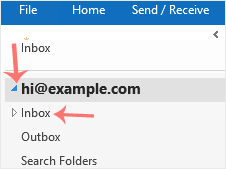
Outlook click inbox to sync


3. Click on Inbox, and it will start syncing.


Need a hand with this?

VoloWeb hosting includes free migration, NVMe SSD, LiteSpeed & 24/7 Indian support — plans from ₹69/mo.

Get Started — ₹69/mo