Email VoloWeb Knowledge Base · 1 min read

How to Forward an Email in Mozilla Thunderbird

Back to Email

You can forward an email to other email accounts using Mozilla Thunderbird.


1. Open Mozilla Thunderbird.
Mozilla thunderbird cpanel icon


2. Go to Inbox. Select the message you want to forward, and it will show the Forward option. Click it.
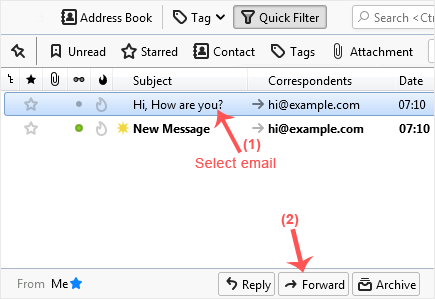
Forward email select message


3. Type your message in the message box. Do not modify the email title and the rest of the text. Then click on send.
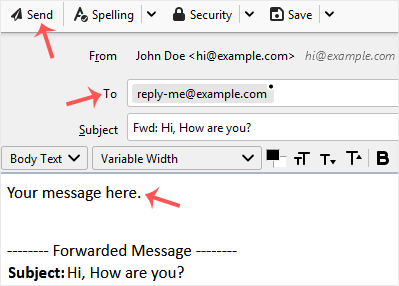
Mozilla thunderbird email forwarded

Need a hand with this?

VoloWeb hosting includes free migration, NVMe SSD, LiteSpeed & 24/7 Indian support — plans from ₹69/mo.

Get Started — ₹69/mo