Backing up is important, and you should do it regularly. Follow this tutorial to make a full backup of your website with SiteWorx.
1. Log in to your SiteWorx account.
2. In the Backups section, click on Backup Now.
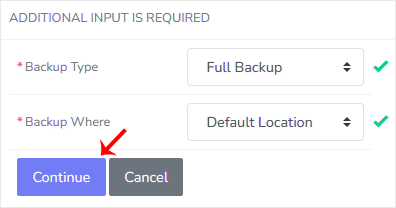
3. Select the backup type and location, then click on Continue.
- Backup Type: Full Backup.
- Backup Where: Default Location or any other option.
4. Enter the following details:
- E-mail status to: Enter your mail address to receive a notification when the backup process finishes.
-
Domain Options: The domains which will be included in the backup.
-
Single Domain: Backup single domain only. Secondary backups will not be backed up.
-
Multi Domain: All domains will be backed up.
-
- Backup Where: For sending backups to a remote location. You will need to enter login credentials for FTP, SFTP, or SCP.
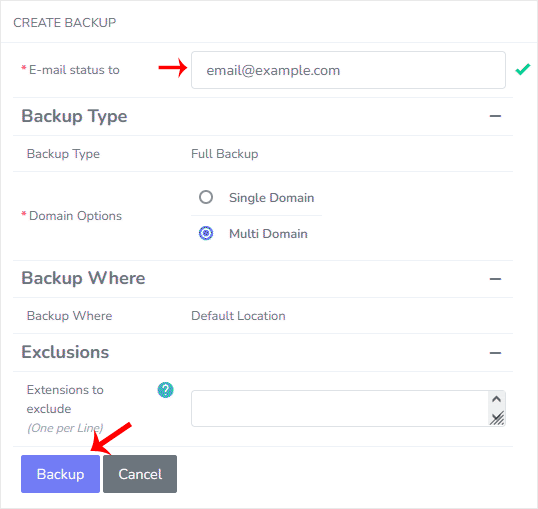
5. Click on Backup.
You will be redirected to the Backup Management page, where you can see the status of your backup progress, and you will be able to download the backup to your computer. After the SiteWorx backup is completed, you will receive a notification.